 Dockfin
The server is already yours
Dockfin does not rent you another computer. It runs on the VPS you already pay for.
Self-hosted PaaS · Open source · MIT
Heroku and Vercel are good at what they do. They are also a second bill, on computers you do not control. Dockfin is the panel you run yourself: one Docker image, a Go API and a React dashboard, deploying apps, databases, and one-click services to the machines you already pay for. Over SSH. Your data stays on your VPS.
$ curl -fsSL https://raw.githubusercontent.com/foisalislambd/dockfin/main/scripts/install.sh | sudo bash
Needs an Ubuntu or Debian VPS with a public IP. Then open http://YOUR_SERVER_IP:8000/ and register the first admin. Nothing is seeded for you.
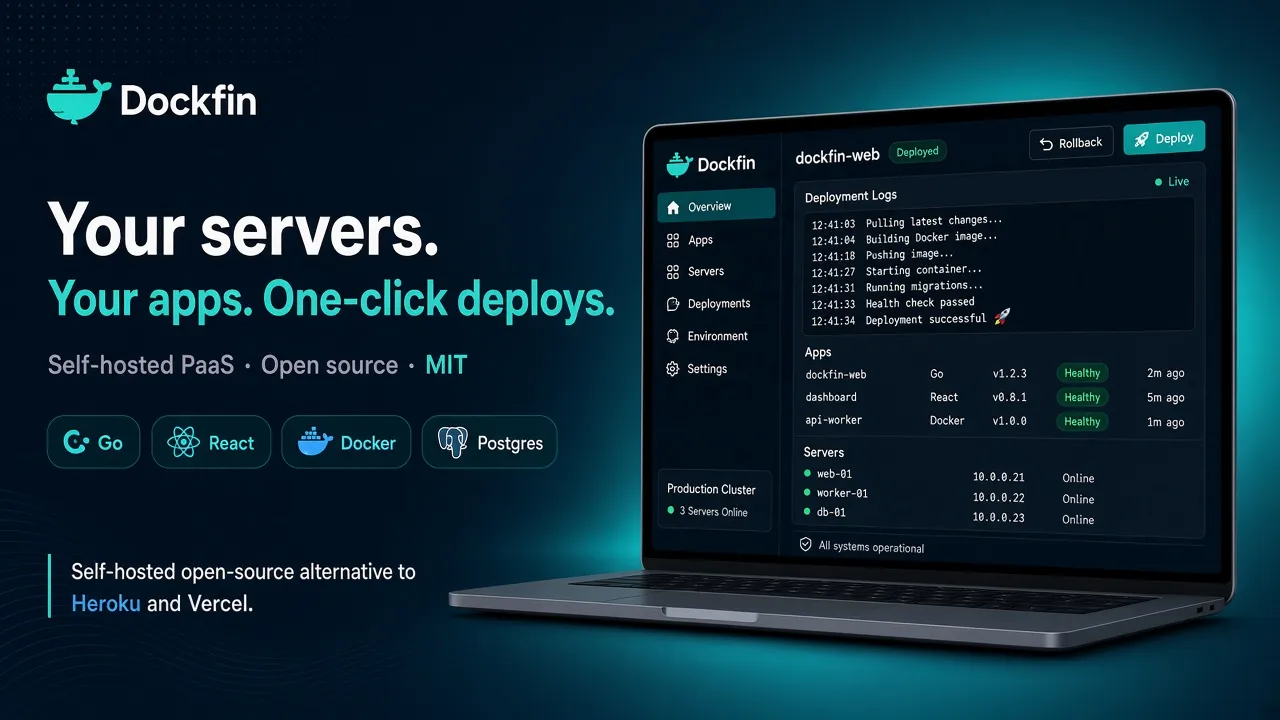
Dockfin does not rent you another computer. It runs on the VPS you already pay for.
The script pulls ghcr.io/foisalislambd/dockfin. The same image is on Docker Hub. API and dashboard ship together. Postgres starts beside them. The panel listens on port 8000.
State stays in Postgres. Deploys go out over SSH. Targets do not need a long-lived deploy agent. Ports 80 and 443 stay free for Traefik or Caddy.
What you feel on a bad Tuesday
A platform earns its keep the night something ships wrong. These are in the product today, not on a roadmap slide.
Live deploy logs. The deployment page replays the log and streams the rest while it happens. Pull, build, migrate, health check. When it fails, you are looking at the line that failed.
One-click rollback. Previous images stay on the server. Roll back from the dashboard, or from dfin.
Per-environment deploy freeze. Dashboard, webhooks, previews, MCP, and rollback wait. What is already running stays up. Owners and admins can override one manual deploy. dfin freeze and dfin unfreeze do it from a shell.
The catalog in the repo is about 360 Compose services. Point one at a server and deploy it, or paste your own Compose file.
dfin --json projects listdfin logs <deployment> --follow
Env vars, freeze, deploy, overview. Commands exit 0 on HTTP success and 1 otherwise.
OpenAPI 3.1 is generated from the live router at /openapi.json, with an HTML index at /api/docs. The spec is in the repo, so you can read it before you install.
The audit log covers auth, deploys, rollbacks, freezes, settings, members, and role changes. Filter and page them. Retention defaults to 90 days.
Turn 2FA on, keep the codes, and the next login asks for the second factor. Turn it off when you mean to.
Signup creates a personal team. Shared teams have invitations and API tokens. Those roles decide who can read the audit log and override a freeze.
On the server
Git webhooks and env vars are part of the same deploy, not a side project.
Dockerfile, Compose, a container image, Railpack, or a static site. Webhooks from GitHub, GitLab, Gitea, and Bitbucket. Env vars resolve when the deploy runs.
Nine engines, including SQLite as a mounted file. Start and stop them over SSH. Backups can go to S3.
About 360 in the repository, plus a custom Compose file when you already know what you want running.
SSH private keys and env values are encrypted in Postgres. The master key is AES-256-GCM. Passwords are argon2id. Webhook signatures are required when a secret is set.
From a fresh VPS to a deploy
01
One command. It installs Docker if it is missing, generates secrets, and starts Postgres and Dockfin. Everything important lands in /data/dockfin.
02
Open port 8000 and create the admin account. That VPS is added as a server for you. Create a project. Add other machines later, still over SSH.
03
The control plane keeps the desired state. Workers build and restart containers on the server. Logs stream back to the dashboard.
The deploy itself runs prepare, fetch, build, run, health, then finalize.
Update latercd /data/dockfin && sudo docker compose pull && sudo docker compose up -d
An honest fork in the road
They are good tools. They are not this tool. If a landing page has to flatten that, it is selling you something.
This is the closer cousin, and it has a head start. Same job in your head: your servers, SSH, Traefik or Caddy, build packs, a catalog of services. Dockfin follows that operator model and rebuilds the control plane in Go, with an API-first React dashboard, an OpenAPI spec generated from the live router, and the dfin CLI.
If you want the project that has already met more strange servers in the wild, use Coolify. There is no user count on this page to pretend otherwise. Choose Dockfin when you want that shape as one MIT-licensed Go image, and a codebase you can still influence.
Dokku is a git-push PaaS. It is small, it is sharp, and the interface is git push. That is the right answer when one server and a buildpack-style deploy is the whole story.
Dockfin is the panel in front of one or many Docker hosts: projects, environments, live logs, rollback, a deploy freeze, databases, and hundreds of one-click templates. If you do not want a dashboard, do not install one.
It is early. Help shape it.
This page will not invent a user count, a logo wall, or a customer quote. If those show up later, they will be real.
What exists today is a production install, a dashboard, and a public checklist: live logs, rollback, deploy freeze, hundreds of one-click templates, dfin, OpenAPI, an audit log, 2FA, and team roles. It is a lot of product for a project you can still bend. It is not a hosted service with a status page and a support contract. You run the image. You keep the disk. When something is rough, GitHub is the queue.
Star the repository if you want the work where you will see it. Open a pull request if a gap is one you can close. CONTRIBUTING.md is the door. The license is MIT, which includes the part where you can fork it and never ask. Security reports stay private — see SECURITY.md.
Install
Ubuntu or Debian, a public IP, and one command. The script pulls the image from GitHub Container Registry, installs Docker if you do not have it, and leaves 80 and 443 alone for the proxy.
$ curl -fsSL https://raw.githubusercontent.com/foisalislambd/dockfin/main/scripts/install.sh | sudo bash